- Published on
GameraSnap iOS 1.4.6: Full UI Refresh with Liquid Glass Support
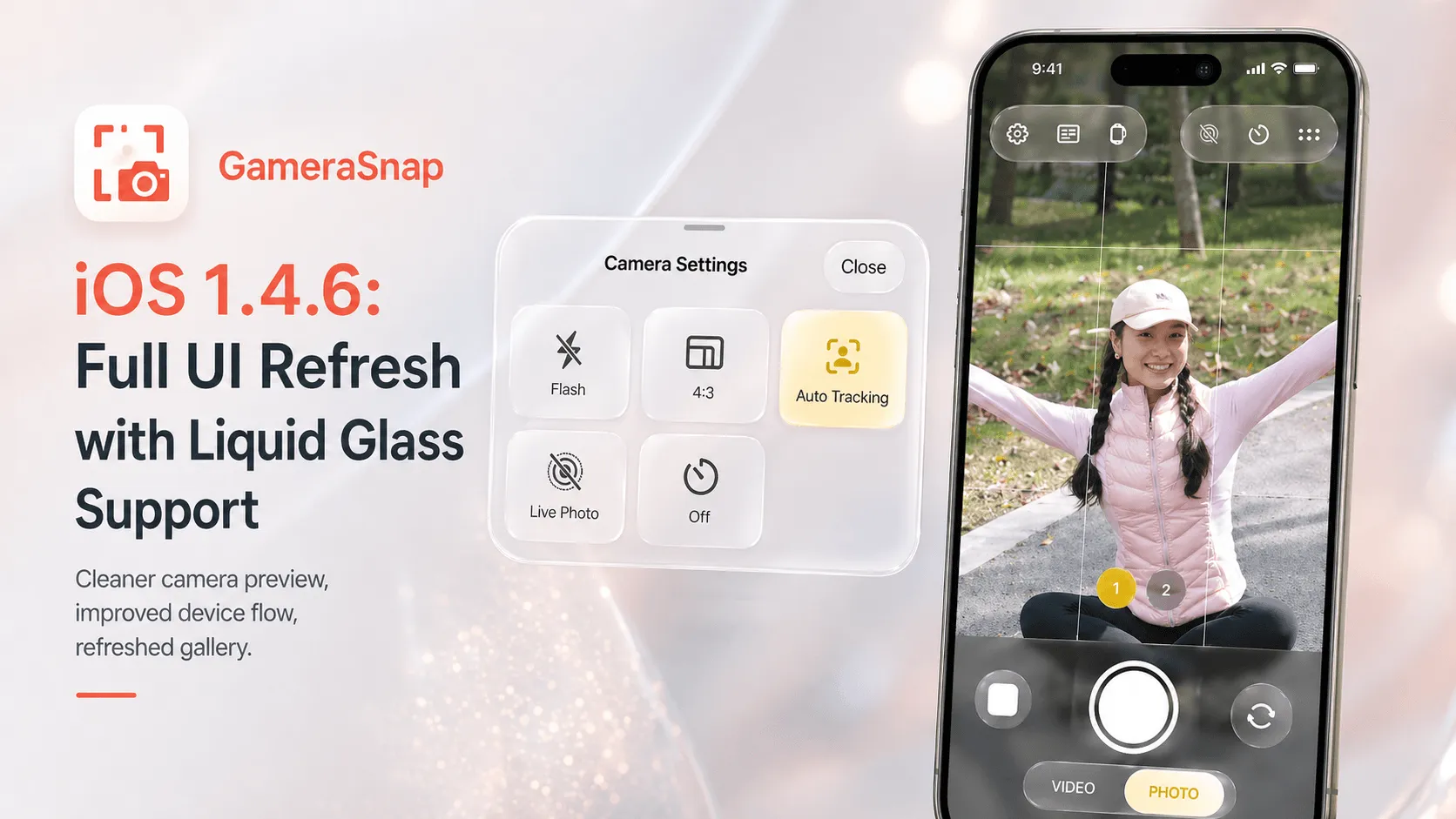
GameraSnap iOS 1.4.6 is a broad polish release. The goal of this version was not to bolt on one isolated feature, but to make the app feel more coherent everywhere people actually use it: camera preview, device connection flow, gallery browsing, paywall screens, and newer iOS visual styles.
The result is a cleaner and more stable iPhone experience, with explicit support for Liquid Glass-style Surfaces on newer iOS versions and graceful fallbacks on earlier versions.
What's New in GameraSnap iOS 1.4.6
Version 1.4.6 includes imProvements across the app:
- A full pass on page layout and visual consistency
- Liquid Glass-ready surfaces for supported iOS versions
- Cleaner camera preview and zoom control behavior
- More stable recording UI and camera session handling
- Refreshed gallery browser and photo viewer interactions
- Improved device management flow for Garmin watch users
- Updated paywall copy and legal links
This is the kind of release you feel while using the app, even if each individual change looks small on paper.
Liquid Glass Support, Without Breaking Older iPhones
One of the most visible changes in 1.4.6 is the app's adoption of a new glass-inspired visual layer for newer systems.
On supported iOS versions, GameraSnap now features:
- Refined Translucent Containers for camera controls
- Dynamic Blur Effects that respond to your wallpaper and lighting
- Modern Glass-style Button Designs for a premium native look
That allows controls and panels to feel lighter, more layered, and more native to Apple's newest interface direction.
Just as important, we did not force that styling onto unsupported systems. GameraSnap 1.4.6 includes compatibility fallbacks so older iPhones still get a clean, readable interface rather than a broken imitation of the new look.
Camera Preview and Control Polish
The camera screen received one of the biggest improvements in this release.
We refined:
- Preview layout balance
- Zoom control placement
- Bottom control spacing
- Capture-mode transitions
- Chrome button hit areas
In practical terms, that means the main shooting screen now feels less crowded and easier to operate quickly, especially when you are trying to frame a shot from your Garmin watch and only glance at the phone briefly.
More Stable Recording UI
GameraSnap 1.4.6 also includes stability work around video recording and camera session lifecycle handling.
That matters because camera apps can feel fragile when:
- the app comes back from the background
- recording mode changes quickly
- preview state and controls fall out of sync
This release specifically improves those transitions so the camera experience feels more predictable during repeated use.
Gallery and Photo Viewer Improvements
We also spent time on the parts of the app people use after taking a shot.
In 1.4.6, the gallery experience has been refreshed with improvements to:
- browser chrome
- filter header behavior
- grid polish
- thumbnail presentation
- viewer interactions
- rotation and sharing flow
This makes it easier to review and manage photos without the post-capture experience feeling like a second-class part of the app.
Better Device Management for Garmin Users
Because GameraSnap depends on a clean connection path between your iPhone and Garmin watch, device handling remains a core part of the product.
Version 1.4.6 improves that experience with:
- clearer device sheet actions
- smoother selected-device state handling
- better watch-app install reminders
- improved sheet presentation flow
The goal here is simple: reduce friction between opening the app and getting to the point where your watch is ready to trigger the camera.
Updated Paywall and Legal Surfaces
We also cleaned up subscription and legal presentation in this version.
That includes:
- refreshed paywall layout
- clearer paywall copy
- restored visibility in preview states
- updated website terms link handling
These are not headline features, but they matter. Purchase screens and legal links are still product surfaces, and they should feel as intentional as the camera UI itself.
Why 1.4.6 Matters
This release is important because it tightens the whole app rather than only one isolated screen.
If you use GameraSnap regularly, the benefits are cumulative:
- the camera view feels cleaner
- the controls feel more deliberate
- the gallery feels less rough
- the device connection flow feels easier to trust
- the app looks more native on newer iOS versions
That is the right kind of progress for a camera remote app. Reliability and clarity matter more than novelty.
Update to 1.4.6
If you already use GameraSnap on iPhone, 1.4.6 is worth installing for the interface refresh alone. If you are on a newer iOS version, you will also see the new Liquid Glass-inspired presentation immediately.
And if you are on an older version of iOS, you still benefit from the broader UI cleanup and camera stability work without losing compatibility.
Conclusion
GameraSnap iOS 1.4.6 is a full polish release with real user-facing impact. It modernizes the interface, improves the camera and gallery experience, strengthens device management, and brings the app in line with newer iOS visual conventions through thoughtful Liquid Glass support.