- Published on
Garmin Sleep Score: Why It's Low and How to Get Closer to 100
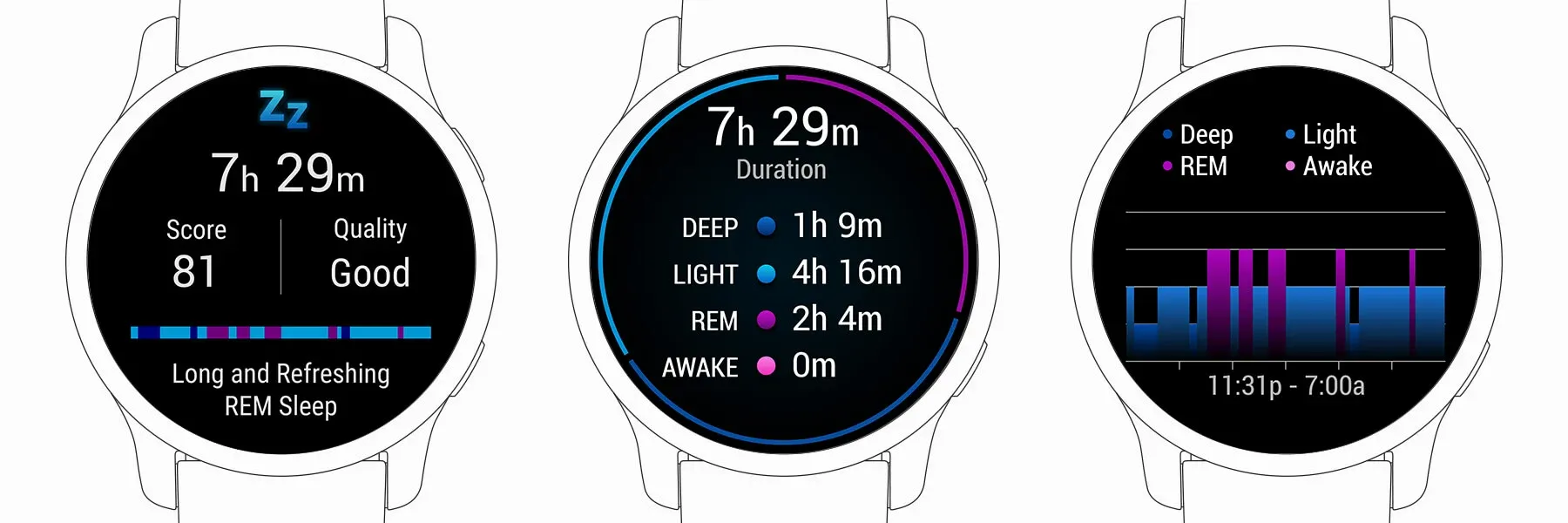
If you searched for Garmin sleep score, why is my Garmin sleep score low, or how to get a 100 sleep score on Garmin, start here: Garmin combines sleep duration, sleep stages, overnight stress, and interruptions into one recovery score. A perfect 100 is possible, but Garmin is not measuring time in bed alone. It is measuring how restorative your night actually was.
Sleep tracking is one of the most useful recovery features on Garmin smartwatches. Garmin Product experts explain that achieving a perfect 100 Sleep Score requires nearly everything to line up at once: enough total sleep, a good balance of sleep stages, low overnight stress, and very few wake-ups.
Key Point: Wearing your Garmin watch to sleep not only tracks your rest, but also powers features like HRV Status, Body Battery, Training Readiness, and daily suggested workouts.
Recommended Garmin Sleep Gear on Amazon
If you want Garmin recovery data without wearing a watch all night, the Garmin Index Sleep Monitor is the most natural add-on to consider. It keeps sleep tracking inside Garmin Connect while moving the sensor from your wrist to a dedicated sleep band.
| Pick | Best For | Why It Fits |
|---|---|---|
| Garmin Index Sleep Monitor | Garmin users who dislike sleeping with a watch | Dedicated sleep tracking for nights when a watch feels bulky, hot, or distracting |
| Garmin Venu 3 | Wellness-first users | Strong all-day health tracking with a comfortable AMOLED smartwatch design |
| Garmin Forerunner 265 | Runners who care about recovery | Connects sleep data with training readiness, workouts, and daily recovery trends |
What Is Garmin Sleep Score?
Your Sleep Score is based on a combination of sleep duration and a variety of sleep quality factors:
- Sleep stages: The amount of time spent in deep, light, and REM sleep
- Overnight stress: Lower stress means a higher score
- Interruptions: Fewer wake-ups lead to better sleep quality
Garmin watches use heart rate variability (HRV) and movement data to detect:
- When you fall asleep
- How you transition through different sleep stages
- When you wake up
💤 How Lifestyle Affects Your Sleep Score
Certain factors can significantly impact your sleep score:
- Alcohol: May help you fall asleep quickly, but often leads to more disruptions and less REM sleep later in the night
- Stress before bed: Elevated stress can reduce restorative sleep
- Late activities: Exercise or excitement before bed can keep your body in a heightened state
Tip: Even if you feel like you slept well, spending most of the night in light sleep or experiencing frequent interruptions can lower your sleep score.
👶 Can You Tell Your Watch About Life Events?
No, unfortunately, you can't notify your Garmin watch that you have a five-week-old baby! Life events like a new baby can disrupt your sleep, but remember: it's temporary, and better sleep is ahead.
📊 Why Sleep Tracking Matters for Garmin Users
Wearing your watch overnight gives you a full picture of your recovery:
- HRV Status: Overnight data is essential for accurate heart rate variability analysis
- Body Battery: Nighttime recharge is crucial for daily energy tracking
- Training Readiness: Quality sleep directly informs your readiness for workouts
📈 How to Improve Your Garmin Sleep Score
- Aim for consistent sleep and wake times
- Create a relaxing bedtime routine
- Limit alcohol and caffeine in the evening
- Manage stress before bed
- Wear your Garmin watch every night
Pro Tip: The more data your Garmin collects, the better it can help you optimize your health and training.
Frequently Asked Questions
How do you get a 100 sleep score on Garmin?
To get a 100 sleep score on Garmin, you generally need the right mix of sleep duration, sleep quality, low overnight stress, and very few interruptions. In practice, that means you need more than "just enough hours" in bed. Garmin's score also reflects how much deep sleep and REM sleep you got, plus whether your body stayed calm overnight.
Is a 100 sleep score on Garmin realistic?
Yes, but it is uncommon. Most users will spend far more time in the 70-90 range than at a perfect 100. A perfect score usually requires a very strong sleep routine, low stress, and a night with minimal disturbances.
Why is my Garmin sleep score low even when I slept a long time?
Because sleep duration is only one part of the score. If your night included frequent wake-ups, elevated stress, poor REM balance, or very light sleep, your Garmin score can still be low even after many hours in bed.
Can Garmin sleep tracking be wrong?
Sometimes, yes. Garmin sleep tracking uses heart rate variability and movement patterns, so it can misread short wake-ups, restless nights, naps, or unusual sleep schedules. It is best treated as a useful trend signal rather than a perfect sleep lab.
Does Garmin sleep tracking affect other metrics?
Yes. Garmin sleep tracking feeds directly into related features such as HRV Status, Body Battery, Training Readiness, and recovery guidance. If you want a fuller picture of how Garmin connects these signals, also read our guides on Garmin Training Status and Garmin Recovery Time.
Related Garmin Guides
To understand how sleep affects the rest of Garmin's training metrics, continue with:
About GameraSnap: The Ultimate Camera Remote for Garmin Watches
GameraSnap is an innovative camera remote control app designed specifically for Garmin smartwatches.
This app lets you control your smartphone camera directly from your Garmin watch—perfect for group shots, outdoor adventures, and hands-free photography. Compatible with both iOS and Android, GameraSnap makes capturing memories easier than ever.
Use your Garmin watch as a camera remote with GameraSnap
Track your sleep, optimize your recovery, and capture every moment with Garmin and GameraSnap!